Compact computer case with a volume of less than 10 liters
Compact computer case with a volume of less than 10 liters

While compact mini PCs have limited upgradeability, and traditional chassis are bulky and consume a lot of energy, compact models (Small Form Factor - SFF) are gradually attracting market attention. This crossover design allows manufacturers to assemble standard desktop computer components in an optimal space.
One of the representatives of this approach is MSI's PRO DP80 A14G, which has a chassis volume of less than 10 liters, smaller than the 30-40 liters of a traditional case, but still integrates high-performance components. The word "A14G" shows that the device is equipped with a 14th generation Intel Core i processor chip, and can also install a separate graphics card, meeting the needs of running some heavy tasks, but is not optimal for AI.
While compact mini PCs have limited upgradeability, and traditional chassis are bulky and consume a lot of energy, compact models (Small Form Factor - SFF) are gradually attracting market attention. This crossover design allows manufacturers to assemble standard desktop computer components in an optimal space.
One of the representatives of this approach is MSI's PRO DP80 A14G, which has a chassis volume of less than 10 liters, smaller than the 30-40 liters of a traditional case, but still integrates high-performance components. The word "A14G" shows that the device is equipped with a 14th generation Intel Core i processor chip, and can also install a separate graphics card, meeting the needs of running some heavy tasks, but is not optimal for AI.

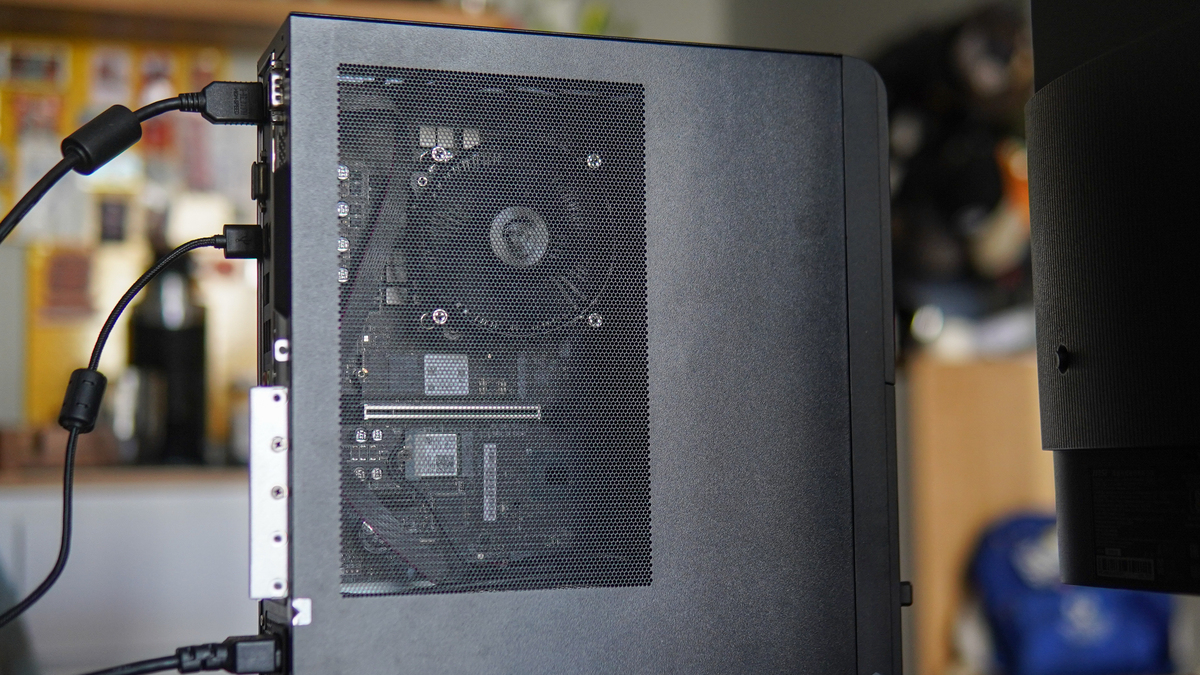
Small-sized computers often encounter barriers in heat dissipation and complexity when users need to upgrade and maintain themselves. On the new model, MSI solved the problem by designing a shell with quick installation and disassembly capabilities, and a chassis space with many mesh areas, helping the air flow inside to easily circulate. Users can see some components, and the high temperature when the machine is operating can be released directly outside.
Small-sized computers often encounter barriers in heat dissipation and complexity when users need to upgrade and maintain themselves. On the new model, MSI solved the problem by designing a shell with quick installation and disassembly capabilities, and a chassis space with many mesh areas, helping the air flow inside to easily circulate. Users can see some components, and the high temperature when the machine is operating can be released directly outside.

However, quick disassembly does not mean less safety. On the case there is a switch of the Chassis Intrusion Detection system, which supports detection and warning when the body is opened illegally. The device is also equipped with dTPM 2.0 technology that allows data encryption at the hardware level. In addition, the case when fully assembled will have a weight of about 4 kg, and comes with a Kensington lock to prevent it from being moved or stolen.
However, quick disassembly does not mean less safety. On the case there is a switch of the Chassis Intrusion Detection system, which supports detection and warning when the body is opened illegally. The device is also equipped with dTPM 2.0 technology that allows data encryption at the hardware level. In addition, the case when fully assembled will have a weight of about 4 kg, and comes with a Kensington lock to prevent it from being moved or stolen.

When removing the side cover, the "interior" of the A14G is revealed with a component arrangement that takes advantage of the space inside. Taking up almost the entire area is the motherboard, in which the CPU area and radiator fan carry the characteristic dragon logo in a prominent position, along with a number of RAM and hard drive slots, while the power supply is pushed to the bottom corner.
However, optimizing the area for the case also reveals disadvantages that reduce the space for upgrading graphics cards. The product supports GeForce RTX 3050 Low Profile discrete card, however the version in the article has not been installed. In addition, the connecting wires are also placed on the front, making the space somewhat "confusing" if not neatly folded.
When removing the side cover, the "interior" of the A14G is revealed with a component arrangement that takes advantage of the space inside. Taking up almost the entire area is the motherboard, in which the CPU area and radiator fan carry the characteristic dragon logo in a prominent position, along with a number of RAM and hard drive slots, while the power supply is pushed to the bottom corner.
However, optimizing the area for the case also reveals disadvantages that reduce the space for upgrading graphics cards. The product supports GeForce RTX 3050 Low Profile discrete card, however the version in the article has not been installed. In addition, the connecting wires are also placed on the front, making the space somewhat "confusing" if not neatly folded.

The back area has a relatively thick density of connection ports. The machine is equipped with two RJ45 network ports simultaneously, including a 2.5G high-speed port and a standard 1G port, allowing Dual LAN mode to be set up to separate the internal network - the Internet or backup connections for businesses. Targeting a group of business users, the machine also integrates many connections such as classic HDMI, DisplayPort and VGA, combined with a COM port specifically for specialized peripheral devices, such as in industrial equipment or transaction counters.
Arranging USB ports close together and right under the LAN port cluster can cause cable tangles, making it difficult to plug or unplug if users simultaneously use plugs with large plastic covers.
The back area has a relatively thick density of connection ports. The machine is equipped with two RJ45 network ports simultaneously, including a 2.5G high-speed port and a standard 1G port, allowing Dual LAN mode to be set up to separate the internal network - the Internet or backup connections for businesses. Targeting a group of business users, the machine also integrates many connections such as classic HDMI, DisplayPort and VGA, combined with a COM port specifically for specialized peripheral devices, such as in industrial equipment or transaction counters.
Arranging USB ports close together and right under the LAN port cluster can cause cable tangles, making it difficult to plug or unplug if users simultaneously use plugs with large plastic covers.

However, putting too many ports on the back is not too big a problem, when users can also connect many peripheral devices from the front. In addition, the device has built-in Wi-Fi 7 and Bluetooth connectivity so users do not need to use too many slots.
At the front, PRO DP80 A14G is finished in a simple style with the typical horizontal lines of the MSI case. The front port cluster includes USB-C, two USB-A ports, headphone jack, SD card slot, micro SD and power button arranged in a horizontal row, easy to operate when placed on the table or under the screen. This is a plus for office users, especially those who frequently plug in USBs, memory cards or headphones. Still keeping the SD and microSD card reader slots on the front also shows that MSI targets users who do content, design or administrative work that needs fast data exchange.
However, putting too many ports on the back is not too big a problem, when users can also connect many peripheral devices from the front. In addition, the device has built-in Wi-Fi 7 and Bluetooth connectivity so users do not need to use too many slots.
At the front, PRO DP80 A14G is finished in a simple style with the typical horizontal lines of the MSI case. The front port cluster includes USB-C, two USB-A ports, headphone jack, SD card slot, micro SD and power button arranged in a horizontal row, easy to operate when placed on the table or under the screen. This is a plus for office users, especially those who frequently plug in USBs, memory cards or headphones. Still keeping the SD and microSD card reader slots on the front also shows that MSI targets users who do content, design or administrative work that needs fast data exchange.

Compactness clearly demonstrates practicality when combined with standard peripherals in a practical workspace. For example, when placed next to a common-sized screen as shown in the picture, the case with a width of less than 10 cm hardly takes up a significant area, helping to free up the desk surface to arrange the keyboard, mouse or data documents. However, when setting up, users need a certain amount of physical space to maintain stable air circulation performance for the heatsink area.
The case allows customization in vertical or horizontal placement depending on the working corner area of a business or individual at home, while the peripheral connection port and power button on the front still face forward for convenient operation.
Compactness clearly demonstrates practicality when combined with standard peripherals in a practical workspace. For example, when placed next to a common-sized screen as shown in the picture, the case with a width of less than 10 cm hardly takes up a significant area, helping to free up the desk surface to arrange the keyboard, mouse or data documents. However, when setting up, users need a certain amount of physical space to maintain stable air circulation performance for the heatsink area.
The case allows customization in vertical or horizontal placement depending on the working corner area of a business or individual at home, while the peripheral connection port and power button on the front still face forward for convenient operation.

In terms of configuration customization, MSI offers a diverse range of processor options, from the popular Intel Core i3 to the high-end i7-14700 or i7-14700F versions. The device in this article uses a mid-range configuration with a Core i5-14400 chip, comes with 16 GB DDR5 standard RAM and a 256 GB SSD storage hard drive.
This is not a very high configuration, but at a decent level for a compact and accessible price, especially when memory chips are scarce on the market. This combination allows the machine to be capable of smoothly handling the entire group of heavy office applications, multitasking with multiple data windows continuously, and playing games at moderate configuration settings.
In terms of configuration customization, MSI offers a diverse range of processor options, from the popular Intel Core i3 to the high-end i7-14700 or i7-14700F versions. The device in this article uses a mid-range configuration with a Core i5-14400 chip, comes with 16 GB DDR5 standard RAM and a 256 GB SSD storage hard drive.
This is not a very high configuration, but at a decent level for a compact and accessible price, especially when memory chips are scarce on the market. This combination allows the machine to be capable of smoothly handling the entire group of heavy office applications, multitasking with multiple data windows continuously, and playing games at moderate configuration settings.

While most new models on the market target AI processing needs and use Intel Core Ultra chips with integrated NPU, products using Core i chips may be behind in the ability to handle artificial intelligence tasks. In return, the machine has the advantage of traditional computing processing power and business software compatibility, easy to upgrade when needed.
Try measuring with Geekbench 6 software, the device reached 2,406 single-core points and 11,680 multi-core points. On the Cinebench application, the CPU recorded 573 single-core points and 3,249 multi-core points, reflecting a decent level of processing capacity. However, with the design of this chassis, users can completely upgrade according to their needs, such as chips and discrete graphics cards if they want to perform advanced tasks such as rendering 3D graphics, editing movies, and playing heavy games.
In addition, the PRO DP80 A14G's cooling system works effectively to help keep cool and optimize power consumption in a small case body. In fact, the cooling fan rarely has to operate at full capacity, and operates relatively quietly even when handling continuous work streams.
While most new models on the market target AI processing needs and use Intel Core Ultra chips with integrated NPU, products using Core i chips may be behind in the ability to handle artificial intelligence tasks. In return, the machine has the advantage of traditional computing processing power and business software compatibility, easy to upgrade when needed.
Try measuring with Geekbench 6 software, the device reached 2,406 single-core points and 11,680 multi-core points. On the Cinebench application, the CPU recorded 573 single-core points and 3,249 multi-core points, reflecting a decent level of processing capacity. However, with the design of this chassis, users can completely upgrade according to their needs, such as chips and discrete graphics cards if they want to perform advanced tasks such as rendering 3D graphics, editing movies, and playing heavy games.
In addition, the PRO DP80 A14G's cooling system works effectively to help keep cool and optimize power consumption in a small case body. In fact, the cooling fan rarely has to operate at full capacity, and operates relatively quietly even when handling continuous work streams.

The small-sized desktop computer market already has the participation of many brands such as HP with Omnidesk, Dell Slim or ThinkCentre Neo. MSI's model makes a difference with its practical design, which can be placed horizontally or vertically depending on the need to set up the working angle. Thanks to its compact size and optimized space arrangement as well as heat dissipation, the machine provides stable operation, good performance, and strong pairing with peripheral devices.
Compared to many mini PCs that prioritize absolute compactness at the expense of expandability, PRO DP80 A14G maintains the necessary harmony for individual and business users. The device is also not equipped with peripheral devices such as mouse and keys, only has a single HDMI cable and some accessory wires. In return, using a small case with a limited power supply and Core i chip, users should not expect outstanding performance levels to handle heavy tasks, or run local AI systems.
The small-sized desktop computer market already has the participation of many brands such as HP with Omnidesk, Dell Slim or ThinkCentre Neo. MSI's model makes a difference with its practical design, which can be placed horizontally or vertically depending on the need to set up the working angle. Thanks to its compact size and optimized space arrangement as well as heat dissipation, the machine provides stable operation, good performance, and strong pairing with peripheral devices.
Compared to many mini PCs that prioritize absolute compactness at the expense of expandability, PRO DP80 A14G maintains the necessary harmony for individual and business users. The device is also not equipped with peripheral devices such as mouse and keys, only has a single HDMI cable and some accessory wires. In return, using a small case with a limited power supply and Core i chip, users should not expect outstanding performance levels to handle heavy tasks, or run local AI systems.