LG StanbyMe 2 Max after 5 days of use: push as hard as you like!

When it comes to the type of TV device mounted on a stand with wheels that can be pushed around the house, LG can be considered the pioneer, the first generation StanbyME. We have also been making videos for you guys for quite a long time. This year LG has the 2nd generation StanbyME and the one I'm using is the Max version, the screen is larger up to 32-inches instead of 27-inches like the standard version, 4K resolution, so the display space is also much wider.
StanbyME 2 Max also uses a 32-inch 4K LCD panel (3840 x 2160), 60Hz refresh rate, has touch, runs webOS 26 on α8 AI Processor Gen3 processor, 2-channel speaker with a total capacity of about 10W supporting Dolby Atmos, Wi-Fi 6E, Bluetooth 5.3 and has a built-in battery. The selling price in Vietnam is about 28 million.

In terms of flexibility, generation 2 is almost similar to the first generation. You can treat it like a mobile screen, like a TV, like a home hub if you're using a smart device in LG's ecosystem, or even like an information board or advertising board. The biggest difference is that there is now a larger screen.
Wheel base: tile floors, wooden floors are good, carpet floors are a bit extreme

The most special thing on StanbyME 2 Max is still the way LG pairs the screen with the stand. The screen is only about 5.6 kg, and the stand weighs about 20 kg, almost all the weight is on the leg so that when you push it, the screen does not tip over. Below the base are wheels to push back and forth in the house.

I tried pushing it on hard tile floors and wooden floors and it went very smoothly. But when pushed out onto the carpeted floor next to Delicate's coffee counter, it started to get a little difficult. However, in Vietnamese houses, there are quite a few carpets all over the floor, usually people only put one in the living room, so for me, moving the StanbyME 2 Max is not a big problem.

You can leave it in the living room. If you don't like it, you can push it into the bedroom or kitchen. Because the screen has a battery, you can push it wherever you want to watch live TV. I find this to be the type of device that makes life easier at home, thanks to its stand and flexibility.
Remove the screen and hang it on the wall as a picture frame


The beauty of the Max version is that you can remove the screen from the stand, to turn it into a secondary screen or a fixed TV through the One Click stand that LG comes with. Or you can hang it straight on the wall. There are two holes at both ends of the screen to hook the cord and LG includes that cord when you buy the device. After hanging it up, it becomes a picture frame, or a TV fixed in one place. The interior space in the house looks much more modern and beautiful.

Can rotate vertically, horizontally, tilt, lift and lower
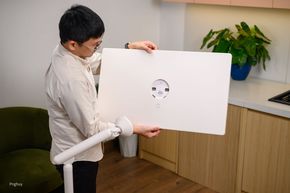
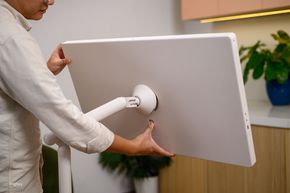
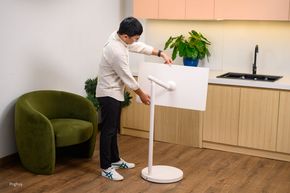
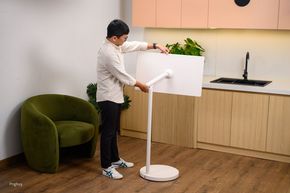
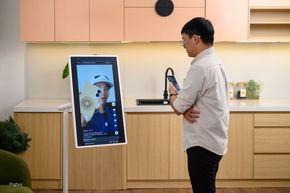
When mounted on the stand, the screen can rotate vertically 90 degrees, horizontally rotate left and right 90 degrees, tilt up to about 25 degrees, and lift and lower very easily thanks to the mount on the stand at the back.

For example, if you are sitting, lower it to eye level, while standing, raise it, then tilt it so it points directly at your face. For me, this is where StanbyME 2 Max can be used in many different scenarios, rather than standing still like a wall-mounted TV.

Turning it vertically, you have a 32-inch 9"16 vertical screen to watch TikTok, YouTube Shorts, which is extremely reasonable. Watching vertical videos on a screen this large is much better than watching on a phone.
Inside is a true LG TV

StanbyME 2 Max runs webOS 26, almost the latest version of LG, the interface is almost no different from a regular LG TV, in fact it is also a TV. Netflix, FPT Play, VTV Go, YouTube, Apple TV are all there, if you're missing anything, you can install more through LG's app store. Both Android and iPhone phones can cast the screen, because the device supports both operating systems.

Included is a remote and the detail I like is that the remote has its own magnetic attachment on the device. If you don't use it, you can breathe it in there. You can always see it. If you need it, just take it out and use it. The remote is the item I find most often lost in the house, so it makes sense for LG to do so, so I don't have to worry about losing it anymore.

The screen has a touch screen so you can surf and touch the screen directly without needing a remote. The situation where I find the simplest and most effective use of touch is to use it as an advertising screen or a customer welcome screen. For example, if you have a store that sells certain products, customers can choose the product themselves or see a demo right on the screen. When entertaining at home, most people will still use the remote more.
Making a 32-inch 4K computer monitor: extremely reasonable

Using StanbyME 2 Max as a computer monitor is extremely reasonable to me. I'm using a 45-inch LG curved screen so I'm used to a large screen. Switching to 32-inch is smaller but not as cramped as 27 or 24-inch, the display space is still large. For laptops, you plug in exactly one USB-C cable on the left side and you're done, and for PCs, you go through the HDMI port. In general, treating it like a 32-inch 4K portable monitor is completely normal, and can be used for Mac or Windows.
Battery: not too long, not too fast, just enough

With a portable, flexible device like this without a battery, there's nothing to say, so this is an important part. My general feeling is that the StanbyME 2 Max's battery is much stronger than the first generation and better than a device of the same type from another brand that I experienced not long ago.

LG announced that the device can watch videos continuously for 4.5 hours, but that is when power saving mode is turned on and the brightness is quite low, so this number is for reference only. I don't turn on power saving and leave the brightness on automatically because the machine has a sensor that detects ambient light to adjust itself. I watched YouTube for more than 2.5 hours and the battery said about 17%. For me, this number is not too long, not too fast, just right, but better than the first generation.

There are two ways to charge. One is to mount the screen on the stand and then plug in the number 8 power cord and it will charge itself. Second is to charge via the USB-C port on the screen, but please note that you need a power source of 65W or more, below 65W it will not charge. Thanks to this USB-C port, you can plug in a high-capacity backup battery, the type that you often take with you on picnics, at which time you can take the screen to the balcony or anywhere, charging and using it without having to worry about finding a power outlet. Just pay attention to the charging capacity, guys.

Talking about speakers, StanbyME 2 Max has two speakers on both sides, total capacity of about 10W, supports Dolby Atmos. When I sit and watch a movie alone in a space that is not too large like a bedroom or living room, I just need to set the volume to about 40 to 50% to hear clearly, no need to turn it on to max. Of course, it cannot give you the feeling of sitting in a movie theater or using a professional sound system, but compared to watching on a phone, it feels larger and more immersive in the movie.
Some things I hope LG upgrades

First is the screen. 32 inches 4K is fine for me, but I wish LG had more OLED options. This version is still LCD so the blacks and contrast cannot be as deep as OLED. Watching movies will not give you the same eye-catching feeling as when watching on LG's OLED TV, but LG's OLED TV is amazing, needless to say. If StanbyME 2 has an OLED version, there's really nothing more to say. Second is the refresh rate, which I think is not very necessary on a mobile screen. Currently the screen is only 60Hz, so watching movies and watching normal entertainment programs is no problem. Only when you plug it in as a computer monitor, especially if you are using a Mac or Windows laptop with 120Hz or higher, will you see a little ripple. For me, this is not very important, if LG can raise it to 120Hz, it would be better.
Conclusion

After a few days of use, I see that StanbyME 2 Max can do a lot of things around the house if you know how to take advantage of it. The design itself is highly portable, the usage scenarios are countless, it's just a matter of whether you can think of what you will use it for or not.