Giới thiệu Vercel Connect

Việc cấp cho các tác nhân quyền truy cập vào các công cụ, dữ liệu và dịch vụ của bạn chính là điều khiến chúng trở nên hữu ích. Khi các tác nhân thực hiện công việc sâu hơn trên các hệ thống, việc xác thực và ủy quyền quyền truy cập đó sẽ trở thành trọng tâm trong kiến trúc ứng dụng của bạn.
Ngày nay, quyền truy cập của tác nhân thường được cấp thông qua mã thông báo nhà cung cấp tồn tại lâu dài được lưu trữ trong các biến môi trường của bạn, được cung cấp cho mọi thứ mà tác nhân của bạn có thể cần. Các mã thông báo này được chia sẻ giữa mọi người dùng, không bao giờ hết hạn và cung cấp cho tác nhân của bạn toàn quyền tiếp cận mọi nhiệm vụ, bất kể công việc nhỏ đến đâu.
Kho tiền làm cho mã thông báo đó khó bị đánh cắp hơn. Nó không làm cho nó bớt nguy hiểm hơn. Vấn đề là điều gì sẽ xảy ra khi mã thông báo bị rò rỉ: mọi thứ nó có thể chạm vào đều bị lộ.
Chúng tôi đã xây dựng Vercel Connect để giải quyết vấn đề này. Hiện ở phiên bản Beta công khai, Vercel Connect thay thế mã thông báo được lưu trữ bằng trao đổi thông tin xác thực thời gian chạy. Bạn đăng ký một kết nối một lần. Khi tác nhân của bạn có việc phải làm, ứng dụng của bạn sẽ chứng minh danh tính của mình với Vercel Connect và nhận lại thông tin xác thực ngắn hạn, phù hợp với nhiệm vụ. Mọi thứ bạn sử dụng mã thông báo vẫn hoạt động. tác nhân chỉ yêu cầu quyền truy cập mỗi lần thay vì giữ nó.

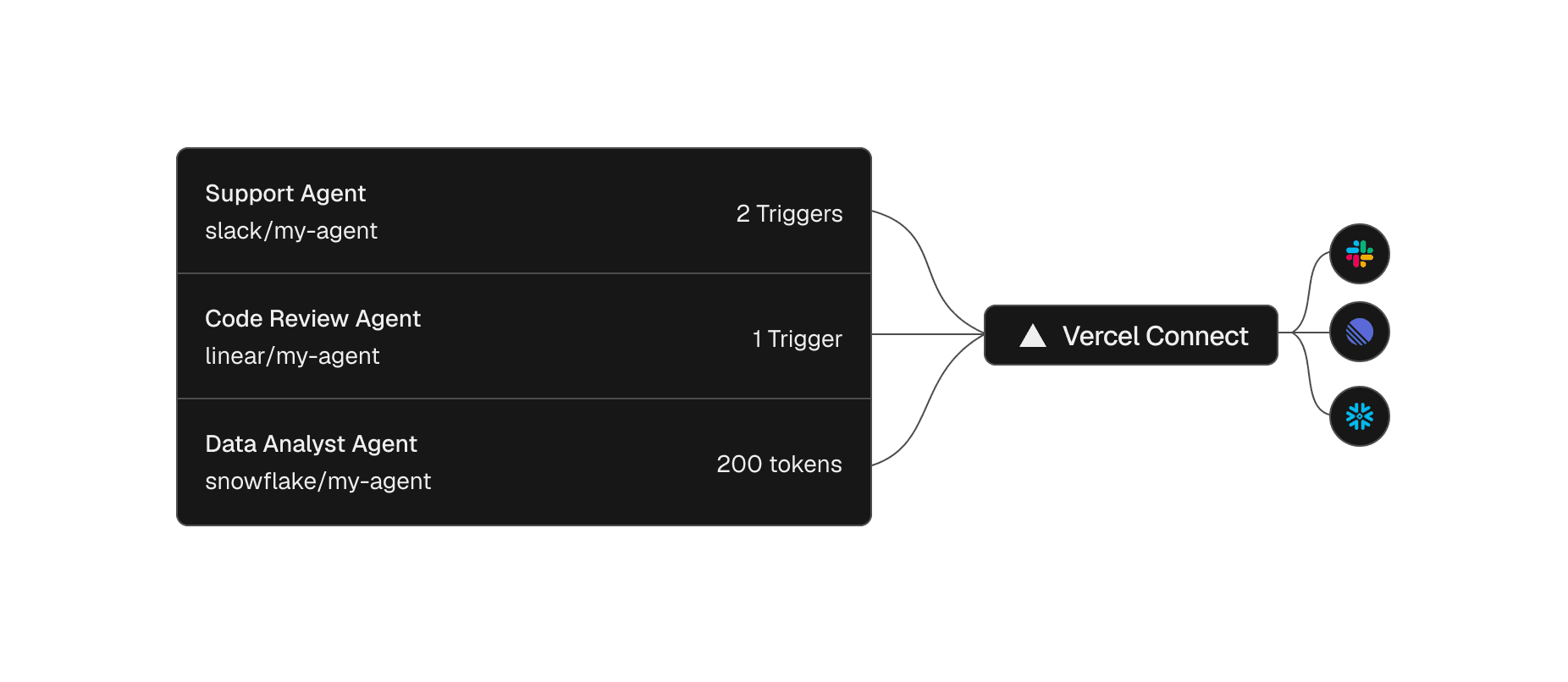
Đăng ký trình kết nối một lần, sau đó sử dụng lại nó trên các dự án và môi trường
Trình kết nối là kết nối có thể tái sử dụng giữa nhóm Vercel của bạn và nhà cung cấp như Slack hoặc GitHub. Bạn tạo nó một lần từ bảng thông tin hoặc CLI, sau đó đính kèm nó vào các dự án và môi trường cần nó, bằng các biện pháp kiểm soát quyền truy cập ở cấp dự án.
kết nối vercel tạo chùng --name mybotTạo trình kết nối Slack
Mối quan hệ với nhà cung cấp sẽ trở thành một thực thể duy nhất mà bạn có thể xem và quản lý, chứ không phải thứ gì đó nằm rải rác trên hàng tá bảng biến môi trường, nơi việc xoay vòng có nghĩa là săn lùng mọi bản sao.
Tác nhân mã hóa của bạn cũng có thể chạy thiết lập này. Cài đặt kỹ năng kết nối vercel với các kỹ năng npx thêm vercel/vercel-plugin --skill vercel-connect và nó có thể tạo và đính kèm các trình kết nối cho bạn.
Yêu cầu mã thông báo có phạm vi trong thời gian chạy
Với một trình kết nối sẵn có, tổng đài viên chỉ yêu cầu thông tin xác thực khi có việc phải làm. SDK @vercel/connect trả về mã thông báo mà bạn sử dụng ngay lập tức đối với API của nhà cung cấp và không có bí mật nào của nhà cung cấp tồn tại trong ứng dụng của bạn.
1import { getToken } from '@vercel/connect';2const token = chờ getToken('slack/mybot', {3 topic: { type: 'app' },4});Yêu cầu mã thông báo khi chạy
Mã thông báo có thời gian tồn tại ngắn, thời gian tồn tại tùy thuộc vào nhà cung cấp. SDK tự động làm mới chúng, do đó bạn không bao giờ xoay bí mật bằng tay. Điều đó để lại một câu hỏi. Nếu ứng dụng của bạn không giữ bí mật thì điều gì chứng tỏ ứng dụng đó được phép hỏi?
Ứng dụng chứng minh danh tính của mình với OIDC
Bằng chứng là danh tính mà ứng dụng của bạn đã có. Mọi hoạt động triển khai trên Vercel đều nhận được danh tính OIDC và khi ứng dụng hoặc tác nhân của bạn yêu cầu mã thông báo, SDK sẽ hiển thị danh tính đó cho Vercel Connect. Vercel Connect xác minh nó, kiểm tra xem dự án và môi trường có được phép sử dụng trình kết nối hay không và trả về thông tin xác thực của nhà cung cấp. Chuyến đi khứ hồi đó là trao đổi thông tin xác thực thời gian chạy.
Danh tính tương tự có sẵn trong quá trình phát triển cục bộ thông qua liên kết vercel và vercel env pull, và bên ngoài Vercel, SDK chấp nhận mã thông báo truy cập Vercel. Dù bằng cách nào, không có bí mật nào của nhà cung cấp trong ứng dụng của bạn có thể bị rò rỉ, chuyển giao hoặc sao chép giữa các môi trường.
Phạm vi từng mã thông báo cho chính xác những gì nhiệm vụ cần
Không phải mọi nhiệm vụ đều cần phạm vi tiếp cận giống nhau, ngay cả trong một tổng đài viên. Một bước có thể đọc kho lưu trữ trong khi bước tiếp theo sẽ mở ra một vấn đề. Mỗi yêu cầu chính xác quyền truy cập mà nó cần và chính yêu cầu đó đặt ra giới hạn. Một yêu cầu có thể bao gồm:
Phạm vi nhà cung cấp
ID cài đặt
Hạn chế về tài nguyên